






Technical files
Documents
Specifications and installation information can be viewed or downloaded as PDFs from our server.
User manuals
2Videos
You can find all of our product and installation videos on our YouTube channel.
Visit Our YouTube Channelr-tec R2 Automatic Door Control Board
The R2 guide describes the pedestrian automatic-door mechanism and control unit. It mentions sliding, single- and double-leaf and telescopic arrangements. The chosen leaf, mechanism and accessory wiring must be checked in the actual installation documents. The guide does not establish replacement of another brand’s board or automatic transition to a night mode.
Technical specifications
- Supply: 230 V
- Motor: 100 W, 24 V DC in the mechanism table
- Selector: hold open / partial open / one-way exit / automatic / hold closed
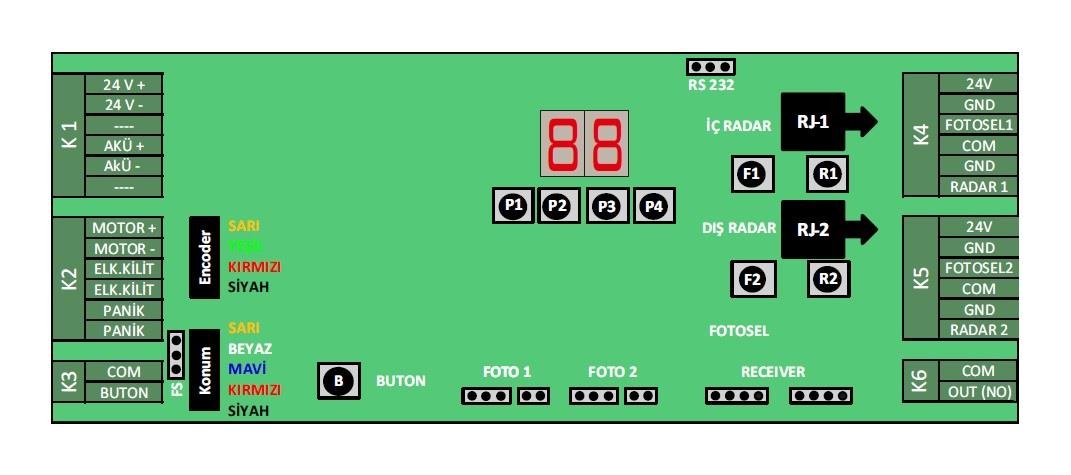
- Connections: photocell and radar terminals in the K4/K5 diagram
- Hold-open time: the R2 t1 table shows 0–60 s and its operating text says 1–60 s; the 2015 general specification’s 0–90 s has a different scope
- Power outage: the guide mentions manually movable leaves and a connectable 24 V battery; no UPS feedback pairing is given
Modes and programming
Page 13 names the function selector’s five modes as hold open, partial open, one-way exit, automatic and hold closed. The selector does not itself document an automatic time schedule or guaranteed energy saving. Page 5 describes stopping and reopening on photocell-beam interruption during closing in the mechanism context; the safety function must be tested on the completed installation.
Technical document
You can reach the R2 automatic door control board user manual from the download section on this page. The installed R2 model’s terminal diagram and mode settings are assessed against its documentation by your dealer or partner’s qualified technical team. Questions requiring manufacturer review are submitted through a dealer, distributor or partner.
Installation and Commissioning
The R2 automatic-door control unit is commissioned after installation by learning the limits and selecting the operating mode. General flow:
- Limit learning: After power-up, 1-2-3 shown in sequence on the display is the normal limit learning; if the door does not work and 1-2-3 persists, the mechanical installation (the leaf seating in the guide, the tension-wheel pressure) is checked.
- Operating mode: Select among the five modes named in the guide; it does not document separately named night or manual modes.
- Parameters and fault codes: Compare display codes (o1–o9, 10, 11, St) with the guide’s fault table; a code alone does not prove the exact cause. Qualified personnel set parameters such as C4 push force within the model range; investigate a jam even if its code has been cleared.
- Safety: The photocells are connected and verified with the test buttons.
Parameter changes must be made only by trained personnel.
Frequently Asked Questions
Below we've compiled the most common questions and answers regarding this product.
-
Error LED is on at the r-tec R2 control board
The R2 guide reports faults as numeric codes on the control-unit display and fault-area LEDs on the right of the function selector. Compare the displayed code with the table on page 13 of the guide. Qualified personnel should perform any maintenance or parameter change.
-
I see a fault warning code on the R2 automatic (pedestrian) door unit display (o1-o9, 10, St)
Page 13 lists o1/o2 jamming, o3 overcurrent, o5 radar, o7 low battery, o8 photocell, o9 low mains voltage, 10 encoder and St service time among the codes. A code alone is not a conclusive diagnosis; for example page 14 calls for checking sensor alignment or a damaged cable for o8. The 1-2-3 sequence after power-up is limit learning. If it persists without door operation, have qualified personnel inspect the mechanical installation. Clearing a jam code without checking its cause is insufficient.
-
The automatic (pedestrian) door does not stop at the closing end and keeps restarting limit learning
Page 14 of the R2 guide says C4 push force may be too high if the 1-2-3 sequence reappears after the closing limit. For that specific situation, it describes reducing C4 by 5 units and cycling power. The mechanical installation and any jam also need inspection; only trained personnel should adjust parameters within the model's stated range.
Contact our team for model-specific information or a quote.