




Technical files
Documents
Specifications and installation information can be viewed or downloaded as PDFs from our server.
Technical specifications
1Key technical specifications
The most critical technical parameters of this product.
- Supply24V DC
- Key count12 (0-9, *,
- PIN code length4 – 8 digits
- Multi-user capacity100 different codes
- OutputNO + NC dry contact
- Night lightingLED key illumination
Show all technical specifications (10)
Control
| Feature | Value |
|---|---|
| LOG record | Last 50 entries (premium variant) |
Mechanical
| Feature | Value |
|---|---|
| Body | Stainless steel or ABS plastic |
| Protection class | IP54 |
| Operating temperature | -20 – +55°C |
Overview
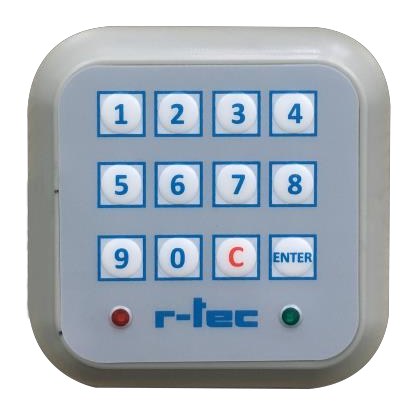
r-tec Coded Access is a keypad-based entry panel that provides door opening with PIN code. It offers authorisation without key/card for garden gate, barrier, industrial door and office entrance. Managed access control with multi-user code support + LOG recording (premium variant).

How does it work?
- User enters PIN code (e.g. 1234)
- Presses # key or auto-verification when code is fully entered
- Correct code → green LED + buzzer tone → door open contact closes
- Wrong code → red LED + warning tone → door does not open
- 3 consecutive wrong → 30 sec lockout (brute-force protection)
PIN length selection
| Length | Combination count | Typical use |
|---|---|---|
| 4 digit | 10 000 | Residence garden (low security) |
| 5 digit | 100 000 | Office + standard workplace |
| 6 digit | 1 000 000 | Industrial + security priority |
| 8 digit | 100 million | Banking + military site |
→ 4-5 digits is sufficient for standard residence; 6 digits is mandatory at industrial/security critical sites.
Multi-user management
With the master code (owner + manager), 100 different user codes can be added and deleted:
- Main owner code (1 piece, immutable)
- Authorised codes (99 pieces, addable and deletable)
- Temporary code (time-limited, premium variant)
Example use:
- Villa: family members (5-10 codes) + cleaning personnel (1 temporary code, weekend)
- Office: employees (50+ codes, deleted on leaving)
- Industrial: shift operators (bulk update at shift change)
LOG record (premium variant)
The premium variant records last 50 timestamped entries:
- Which code was entered (user ID)
- When (hour:minute date)
- Successful / failed
→ Critical for security audit or lost key/code tracking. The standard variant does not LOG record (only works in real-time).
Key/card vs password — advantage
| Authorisation | Advantage | Risk |
|---|---|---|
| Physical key | Intuitive use | Lost/stolen → lock change |
| Card | Easy management | Lost → card deactivation + new card cost |
| PIN password | No loss, no key | Code sharing risk (training required) |
→ At sites with frequent personnel changes, coded access = no additional card management cost.
Target projects
- Villa and estate garden gate (family + cleaning code)
- Apartment common entry (resident code)
- Small office + workplace side door
- Industrial shift control
- Sports facility changing room entry
- Rental flat entry (code renewal at tenant change)
Field discipline
- Master code confidentiality — Nobody outside owner/manager should know; default master “0000” is not left unchanged
- Code length selection — 4-8 digit decision based on site
- Key wear — Frequently used keys wear out in 2-3 years; worn keys = code guessing risk
- Periodic code change — Master code renewal every 6 months + user code renewal every 12 months recommended
- LOG audit — Premium variant LOG check every 3 months; suspicious attempts monitored
- Rain tightness — IP54; upper canopy recommended outdoors
- Emergency backup access — Mechanical key backup (stored with owner + dealer) in case of PIN loss
Frequently Asked Questions
Below we've compiled the most common questions and answers regarding this product.
What is the factory password on the r-tec keypad (TR-LOCK) and how is it used?
The factory password is 1234; a 4–8 digit password can be set. In use, type the password and press Enter — if correct the green LED lights once and the door opens, if wrong the red LED lights. Wiring: +24 V red, −24 V black, COM white, NO yellow.
How do I change the keypad password?
Hold Enter for 10 seconds (release when the red and green LEDs are steady), enter the old password and press Enter, enter the new password and press Enter, then enter the new password again and press Enter — when the LEDs flash 5 times the password is saved. If the LEDs go off at the last step, the password was entered incorrectly; repeat the procedure from the start.
Contact our team for model-specific information or a quote.