



Back to product family

Model details

r-tecby Alkur RT-3H-IR14

r-tec IR-14 Motion and Presence Sensor

Active Infrared Reflection (AIR) motion + presence sensor for pedestrian approach detection at automatic doors. 4-row depth + adjustable width + 4-frequency.

Brand site and details Up-to-date technical content and models are mostly published on the brand site; you can access them via the link.

Technical files

Documents

Specifications and installation information can be viewed or downloaded as PDFs from our server.

Key technical specifications

The most critical technical parameters of this product.

  • Model3H-IR14
  • Detection methodActive Infrared Reflection
  • Supply voltageAC/DC 12 – 24V ±10% 50/60 Hz
  • Power consumption (AC 12 V / AC 24 V)1.3 / 1.5VA max
  • Power consumption (DC 12 V / DC 24 V)65 / 35mA max
  • Max. installation height3.0m
Show all technical specifications (16)

Performance

FeatureValue
Depth adjustment (rows)4 rows (R4 – R1) + angle 0° / +5°
Width adjustmentWide / Narrow (trimpot)
Presence timer2 / 30 / 60 sec or ∞
Frequency4 frequencies (max 4 sensors interference avoidance)
Output holding time0.5sec

Control

FeatureValue
OutputRelay 1c (NO + NC + COM), DC 50 V / 0.1 A, fail-safe

Mechanical

FeatureValue
Operating temperature-20 – +60°C
Dimensions210 × 59 × 28.5mm
Weight180g (approx.)
ColourSilver (S) or Black (BL)

Overview

r-tec IR-14 (model 3H-IR14) is a motion + presence sensor operating on the Active Infrared Reflection principle. It is used at automatic door applications to detect approaching pedestrians and trigger automatic opening. The detection area is finely calibrated to the site with 4 depth rows (R4-R1) + Wide/Narrow width + 4 frequency options.

Manufacturer classification: “Motion and Presence Sensor” — detection method is specified as Active Infrared Reflection (not microwave radar).

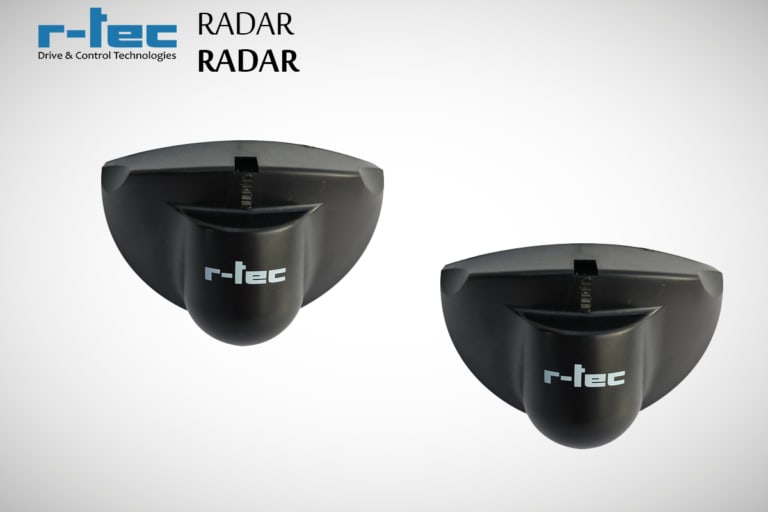
r-tec IR-14 Sensor — product image

Two detection modes

After power-on / reset, the sensor enters one of two modes depending on the area:

  • Motion detection — If there are moving objects after power-up, the sensor stays in motion detection mode.
  • Presence detection — If the area is empty after power-up, the sensor enters presence detection mode; once a moving object enters it switches to motion mode, and once stable for 7 sec it returns to presence mode.

Detection area adjustments

1. Angle (Body)

Move the sensor body to select 0° or +5° detection angle.

2. Depth (dip switch — number of rows)

Active rowDip switch
R4 (deepest)Switch 4 ON
R3Switch 3 ON
R2Switch 2 ON
R1 (closest)Switch 1 ON

3. Width (trimpot — Area Mask)

Turn the side trimpots to adjust Wide ↔ Narrow detection width.

Sensitivity

Select the appropriate level based on mounting height:

Height (m)Sensitivity setting
2.0 – 2.5L – M
2.5 – 3.0M – H
  • If the sensor does not detect a person, increase sensitivity
  • If the sensor detects in empty area, decrease sensitivity

Monitor Mode + Self-Monitoring

  • Normal mode — Standard detection.
  • Snow mode — Reduces false triggers from snow / leaves / moving debris; pedestrian detection sensitivity also decreases.
  • Self-Monitoring — On sensor fault, relay output keeps the door open + red/green LED blinks alternately. Set via dip switch ON/OFF.

Frequency (interference avoidance)

Depending on the number of nearby sensors, dip switches 5+6 select among 4 frequencies (A / B / C / D). Up to 4 sensors can operate side by side at different frequencies.

Wiring (4-wire)

CableFunction
GreenN.C. (relay)
YellowN.O. (relay)
WhiteCOM (common)
Red / BlackSupply (non-pole AC/DC)

Target projects

  • Mall, hotel, office automatic entrance door (pedestrian approach detection)
  • Hospital + health facility entrance door
  • Showroom + luxury retail automatic door
  • Airport transit door (high traffic)
  • Industrial facility pedestrian passage door

Field discipline

  • Max installation height 3 m — Detection breaks at higher mounting
  • No moving objects in detection area during setup + reset
  • Reflected sunlight — Strong reflection from the floor causes false triggers
  • Direct rain / snow on unit — Upper canopy recommended (IP54 but for long life)
  • Vibration — Mounting point must not vibrate (detection breaks)
  • WiFi / 2.4 GHz — Nearby electronics can cause interference; change the frequency dip switch
  • Lens cleaning — Dust / rain stains → wipe once every 3 months (do not use IPA, only a dry soft cloth)
  • Detection troubleshooting — Follow the troubleshooting table in the PDF (cable connection, voltage, sensitivity, monitor mode) in order

Contact our team for model-specific information or a quote.

Share this model

Contact

You're close to a journey full of innovation and inspiration

Reach our team for product selection, technical specifications or a price quote.

r-tec IR-14 Motion and Presence Sensor
WhatsApp